¶ Destinations
Destinations allows you to control incoming calls from your DID (Direct Inward Dial) number to a particular internal extension, such as an IVR, a Ring Group, a Time Condition, or even to a deskphone extension directly.
A separate Destination entry should be created for each unique DID that is attached to your account.
To configure destinations for incoming phone calls
-
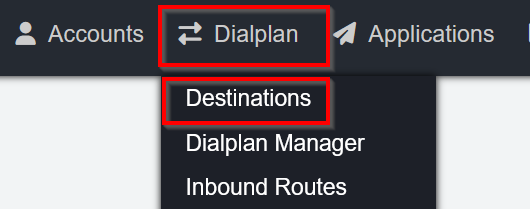
Open Dialplan → Destinations
-
Click +Add at top right of page
-
Type will default to Inbound - no change required
-
Destination is the Phone Number
-
From the Actions drop down menu, select the pre-configured location the number is to be directed to (e.g. Extension, Voicemail, IVR, Ring Group, etc)
-
Click Save
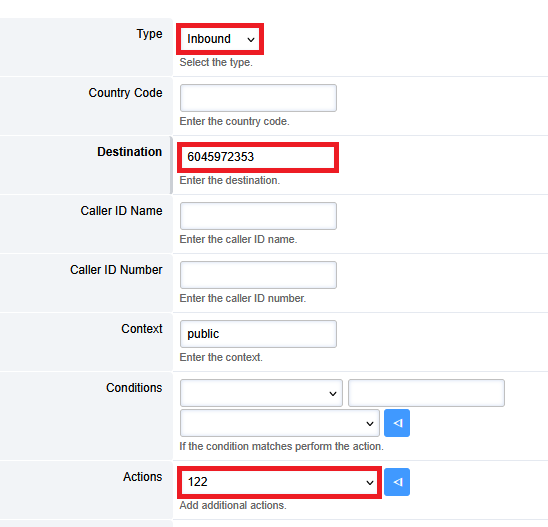
In the example above, inbound calls to the destination phone number will be sent to the extension entered in the Actions field.
Programming the Destination will automatically update the Inbound Route and the Dialplan.
¶ Call Flows
NOTE: This is an advanced topic and is typically not necessary for most clients. If unsure about accessing and modifying devices, please reach out to the System Installer.
Direct calls between two destinations by calling a feature code.
To configure a Call Flow
-
Open Applications → Call Flow
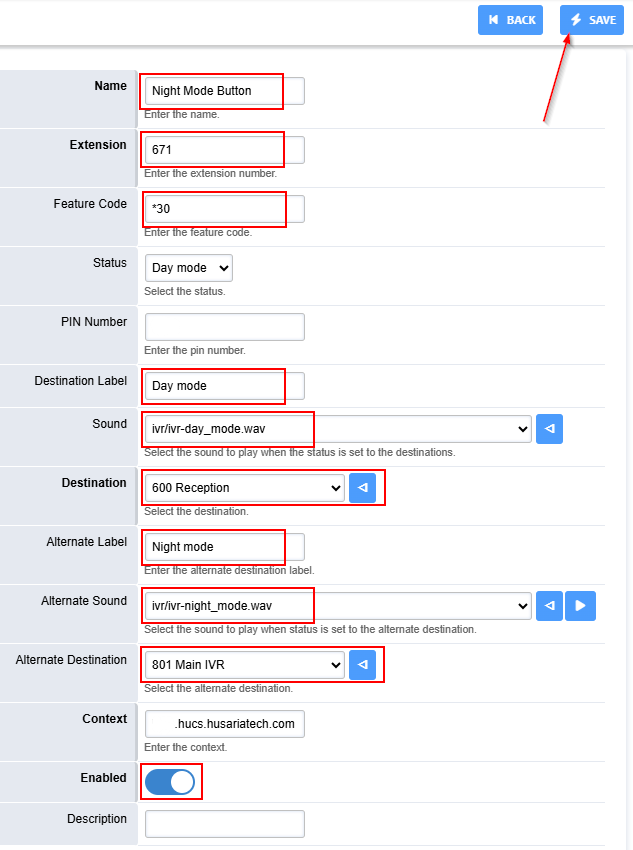
Name: Define the name of the call flow.
Extension: Define what extension to use. HUCS Standard is 671 -> 679
Feature Code: Define what * number to use (must be entered to assign a BLF button to a call flow)
Pin Number: optional Define a pin number in order to restrict access.
Destination: Define where the call will go in the intial mode.
Sound: Define the sound that will play once mode is engaged.
Destination: Define what the destination will be.
Alternative Label: Label that will show when alternative mode is in use.
Alternative Sound: Define the sound that will play once alternative mode is engaged.
Alternative Destination: Define where the call will go in the alternative mode.
Description: Label what this call flow does.
Save the Configuration
-
Add a BLF Line key to the Devices that will be able to
program a BLF button that has a value of flow+*Feature Code. example, flow+*30

- Add the Call Flow to the Destination path